First announcement of our Autumn Release 🍂: CTD now syncs your calendar and contacts from Google or Outlook. Your meetings and your saved contacts join emails, LinkedIn connections, and career overlap as signals in your relationship graph, and your scores get noticeably sharper.
Why these two signals matter
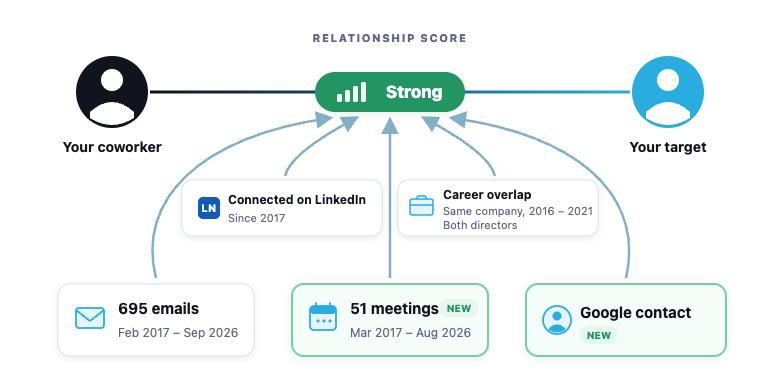
Relationship intelligence is only as good as the signals behind it. Until now, CTD built your graph primarily from email history, LinkedIn connections, and career overlap. That already finds most real relationships, but it misses two things people do deliberately:
You meet with people. A recurring meeting is one of the strongest signs of an active relationship there is. “Met 51 times, last meeting in October” tells you more than any score.
You save people. Nobody saves a contact by accident. A saved contact is a deliberate act that says “this person matters to me”, and it often carries the email address and phone number your graph didn’t have.
With Calendar & Contacts sync, both now feed directly into your relationship scores, alongside everything CTD already knows:
What you get
- All your contacts, one network. Your Google and Outlook contacts, including their email addresses and phone numbers, are deduplicated and connected with your existing email and LinkedIn network.
- Walk into every meeting prepared. Your upcoming meetings appear in CTD with mutual connections and details for every attendee.
- Meeting history inside every relationship (Business Edition). See how often anyone on your team has met a contact, and how recently.
- Sharper relationship scores (Business Edition). CTD scoring now draws on every signal you have: emails, meetings, LinkedIn connections, career overlap, and saved contacts. The most accurate picture of your network yet.
How to turn it on
Individual edition: sign in at app.ctd.ai and connect your Google or Outlook calendar and contacts from settings. It takes about a minute, and your graph starts updating right away.
Business edition: your IT admin can enable it workspace-wide by adding two read-only scopes to CTD’s existing domain-wide delegation; the admin guide walks through it step by step. Google Workspace is supported today; Microsoft 365 workspace-wide sync is coming soon.
Privacy, in plain terms
- All calendar and contacts access is read-only: CTD can never modify, create, or delete your events or contacts. See exactly which scopes we request for calendar and contacts.
- Meeting history and contact signals are shared within your workspace only, never visible outside your company.
- You (or your admin) can revoke access at any time.
Frequently asked questions
Is it read-only?
Yes. CTD requests read-only scopes and can never create, modify, or delete your events or contacts. You or your admin can revoke access at any time.
Does it work with both Google and Outlook?
Yes. Individuals can connect either from app.ctd.ai. For workspace-wide sync on Business Edition, Google Workspace is supported today and Microsoft 365 is coming soon.
What does CTD do with my meetings and contacts?
They become signals in your relationship graph: saved contacts join your network with their details, meetings power meeting prep and per-relationship history, and both strengthen your relationship scores. These signals stay within your workspace.
Is the meeting data available through the API and MCP?
Yes. Everything meetings add to the graph is exposed through the CTD API and MCP. Every path between two people now carries their first meeting, their last meeting, and how many meetings they have had, and on Individual edition you see the same details for your own contacts. Connect CTD to Claude or any MCP-compatible tool and ask things like “when was my last meeting with this person?” or “who on my team met this company most recently?”, or pull the same fields from the API to enrich your CRM or build pre-meeting briefs.
How do I turn it on?
Individual edition: connect from settings at app.ctd.ai. Business Edition: your IT admin follows the admin guide.