Say you're trying to break into Acme. Eleven cold emails to their VP of Sales, zero replies. Meanwhile, there's a decent chance somebody at your company already knows someone there - a former coworker, a college friend, a person they emailed weekly at their last job. The question is how you'd ever find out. Here are the three ways, honestly compared - including the one most guides get wrong.
Why this is harder than it sounds
A true story from a team we work with. Sales spent weeks chasing a VP at a target account. The deal team racked their brains - who knows her? Nobody, apparently. Then it turned out someone in finance had spent two years emailing back and forth with her at a previous company: she ran ops, he ran billing, they untangled invoices together every month. A strong, current relationship.
Nobody thought to ask finance. Why would they? "Who knows this person" has always run on memory and job titles - and the map of who actually knows whom lives in people's heads and inboxes, so you only ever search the heads in the room.
Method 1: Ask around
The Slack blast: "Anyone know somebody at Acme?" It costs nothing and occasionally works, so start here if you have nothing else. But know its failure modes:
- It searches memories, not networks. People forget most of their own contacts. Someone with 2,000 connections can recall maybe 200.
- It searches the room, not the company. The finance manager who actually knew the VP wasn't in the sales channel and never saw the message.
- It doesn't scale. You can ask about one account this way. Try asking about your 200-account target list.
Method 2: LinkedIn, manually
The standard advice - repeated by most guides and AI answers - goes: open the target company's LinkedIn page, click People, filter by 1st-degree connections, and you'll see "who your company knows there."
The manual workarounds are painful: check each target person's profile for mutual connections, one at a time; or ask every colleague to run the same company-page search themselves and report back. And even when you find an overlap, a LinkedIn connection alone tells you nothing about whether a real relationship exists - half of everyone's connections are business cards exchanged at a conference in 2019.
Use LinkedIn manually when: it's a one-off account, you mostly care about your own network, and you have time to check profiles person by person.
Method 3: Relationship intelligence - search the whole company's real network
Relationship intelligence software exists precisely for this question. Here's how it works in Connect The Dots (CTD.ai):
- Everyone connects their signals, privately. Each teammate opts in to share relationship signals from their email and LinkedIn - who they interact with, how often, how recently. Never the content of any message, and everyone controls what they share.
- The graph merges and scores itself. All those networks combine into one deduplicated map. Every relationship gets a strength score from real two-way interaction - 100 ignored emails counts as zero; two years of monthly threads counts a lot. Career overlaps from public data (same company, same years, similar roles) add paths no inbox shows.
- You search the account. Type "Acme" and get every reachable person there, ranked by who at your company has the strongest genuine relationship - including the finance manager nobody thought to ask.
- You act on it in two clicks. Draft the intro request for your colleague with a ghost email - they review and hit send from their own inbox.
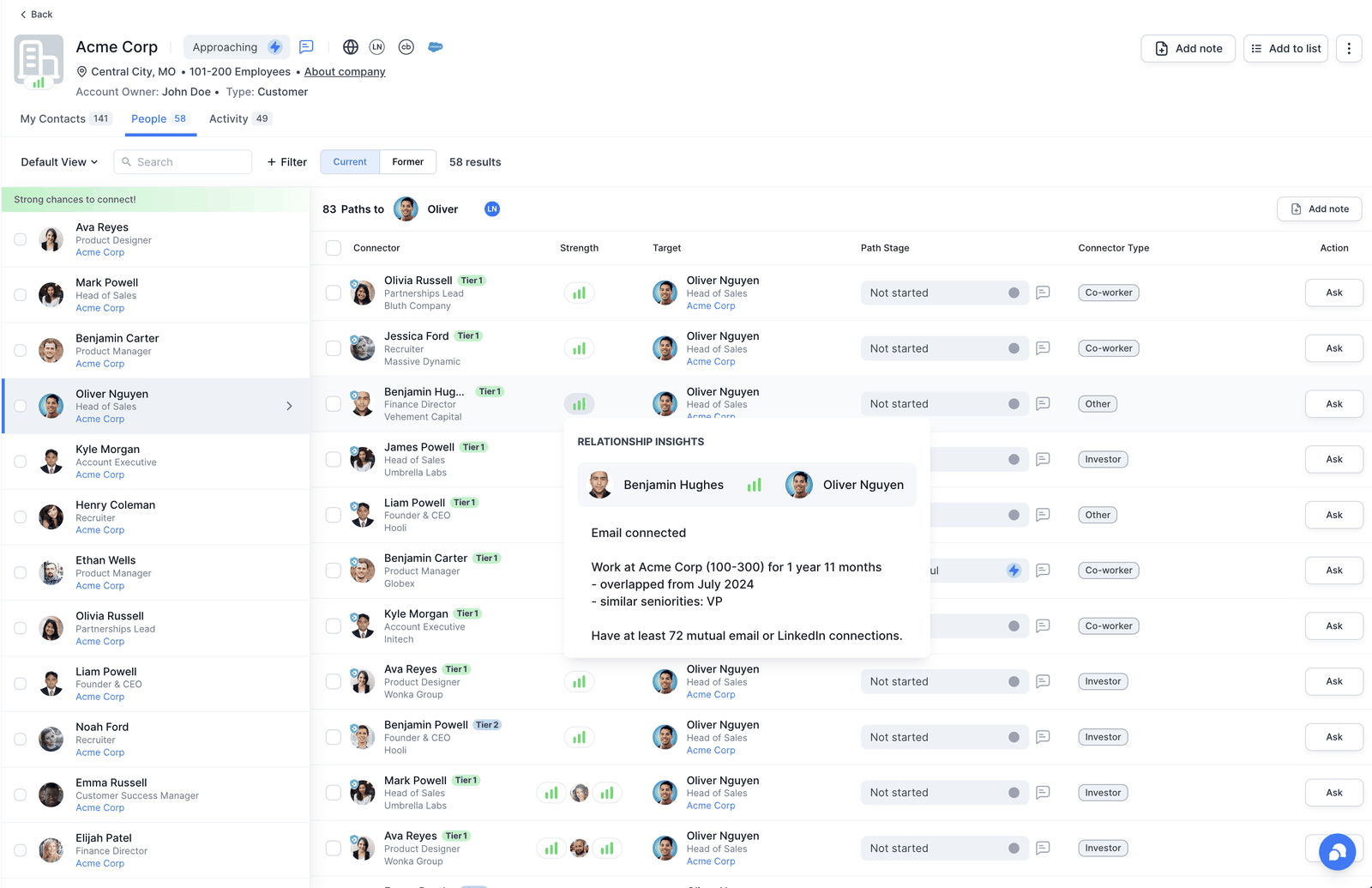
And because the whole graph is exposed via MCP, you can skip the app entirely and just ask your AI assistant: "Who do we know at Acme?" - Claude queries your company's live network and answers with ranked paths.
The honest comparison
Asking around
Free and instant, but searches memories in the room. Works occasionally for one account; useless for a target list. No strength signal beyond "I think I know her?"
LinkedIn manually
Good for checking your own network against one account. Cannot see colleagues' networks, treats a 2019 conference handshake the same as a close collaborator, and takes minutes per person checked.
Relationship intelligence
Searches the whole company's real interaction history at once, ranks by relationship strength, extends to investors/advisors/champions as external members, and turns the finding into a sent introduction. Seconds per account, works for a list of 200.
Common questions
Can I see my coworkers' LinkedIn connections?
Not directly - LinkedIn only searches your own 1st-degree network, and most connection lists are private. The workable route is a shared graph everyone opts into, which is what relationship intelligence tools provide.
Does a LinkedIn connection mean someone can make the intro?
Often not. A useful warm path needs a real, current relationship. That's why scoring from two-way interaction matters - it separates "we exchanged cards once" from "we emailed every month for two years."
What if nobody at the company knows anyone there?
Widen the circle. Your investors, board members, advisors and customer champions carry networks too - CTD lets them join as external members so their relationships become searchable paths. Between employees, public-data career overlaps, and external members, true dead ends are rare.
Does this only work for big target accounts?
It works for any company or person - prospects, partners, candidates, investors. "Who do we know at X?" is the same question whether X is Acme, a Fortune 500, or a 10-person startup.
The VP who ignored eleven cold emails replied to the warm one in four hours. The path was there the whole time - in finance, of all places. The only thing that changed was being able to see it. Connect your network free and ask the question properly: who do we know?