Calendar access gives CTD read-only access to your team’s calendars and events. Meetings are one of the strongest indicators of a real relationship, and turning this on unlocks four things:
1. Meeting prep: see who you’re meeting, and how you’re connected
CTD shows your upcoming meetings with the participants of each one, and for every participant, how you and your company are connected to them: mutual connections, colleagues who know them, and the strength of those relationships. You walk into every meeting knowing exactly who is in the room and which warm paths lead to them.
2. Meeting history inside every relationship
When you look at how two people are connected, say your CEO and a target buyer, you see their shared meeting history as part of the picture: how many meetings they’ve had, when the first one was, and how recent the last one is. “5 meetings, first one two years ago, most recent last month” tells you far more than a score alone.
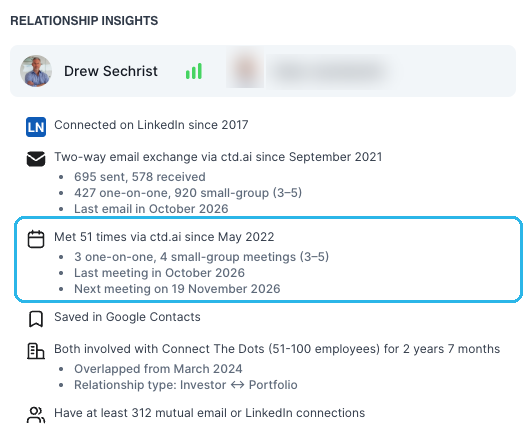
3. More accurate relationship scores
Meeting frequency and recency feed directly into CTD’s relationship scoring. With calendar access on, your team’s scores reflect not just who emails whom, but who actually spends time together, so the warmest paths rank where they should.
4. A meeting log on every contact
Every contact’s page includes the full list of previous meetings with that person, giving your team instant context on the history of the relationship before they reach out.
Without calendar access
Calendar sync stays off. Relationship scores are built from the other connected signals, such as email history, contacts, and LinkedIn imports, and none of the meeting views above are available.
Learn more
CTD can never create, edit, or delete events: access is strictly read-only. See adding Contacts & Calendar sync for the scopes involved and what data CTD collects.