Third announcement of our Autumn Release 🍂: ghost emails just got their biggest upgrade yet. They’re now ghost messages: an intro can go out by email, LinkedIn or text, and it can travel through as many people as it takes to reach the right sender.
Send it where the relationship lives
Some people live in their inbox. Others only answer on LinkedIn, or reply to a text in seconds and leave emails unread for a week. The best intro is the one that lands where the target actually pays attention, so you choose the channel when you write the message, and anyone in the chain, including the sender, can change it:
- Email. The sender reviews it, edits if needed, and clicks Send. It goes out from their own mailbox, with formatting and attachments, exactly like ghost emails today.
- LinkedIn. One click opens LinkedIn messages with the text already copied, so the sender just pastes and sends. Plain text, one person.
- Text. One click opens the conversation with the target, with the message already filled in. Edit if needed, and send. Plain text, one person.
Whatever the channel, nothing goes out until the sender sends it, and they can edit the message first. It’s their relationship and their voice.
Pass it along, as many times as it takes
The warmest path to a target is rarely one hop. Often it looks like this: your AI agent finds the path and drafts the intro, then shares it with you. You share it with your CEO, your CEO shares it with an investor, and the investor sends it to the target.
Until now, that meant forwarding the request by hand at every step. Ghost message chains have no limit on the number of people: you start the chain, add anyone in between, and the recipient is last. The last person before the recipient sends the message.

Two ways to start a chain: you, or your agent
Every ghost message has an author: whoever writes the message, sets the channel and starts the chain. Sometimes that’s you. More and more, it’s an AI agent working for you. Ghost messages are built for both.
You write it for someone in your company
This is the classic ghost email, now with more reach. You find the warm path, write the intro your CEO, a board member or a colleague should send, and pick the channel that fits the relationship. Then you share it with them, or with the next person who can get it there.
It’s how sales, BD and platform teams work on behalf of their executives: you do the writing, they do the sending, and nobody’s inbox turns into a copy-paste relay. A typical chain is short (You → your CEO → the target), but it can be as long as the path needs.
Your agent writes it for you
Ghost messages fit naturally into agent workflows, because an AI agent can be the author too. Connect CTD to Claude or any AI tool through CTD’s MCP, and your agent can find the warmest path to every account on your list, draft a personal intro for each one, set the channel, and share the drafts with you. Try a prompt like:
From there it’s an ordinary chain: you review the drafts, pass each one along, and a person who knows the target sends it. Your agent does the research and the writing, but it never sends anything on its own. That’s what makes it safe to let agents run your outreach at scale. See ghost messages via MCP to set it up.
Everyone sees what they need, and nothing more
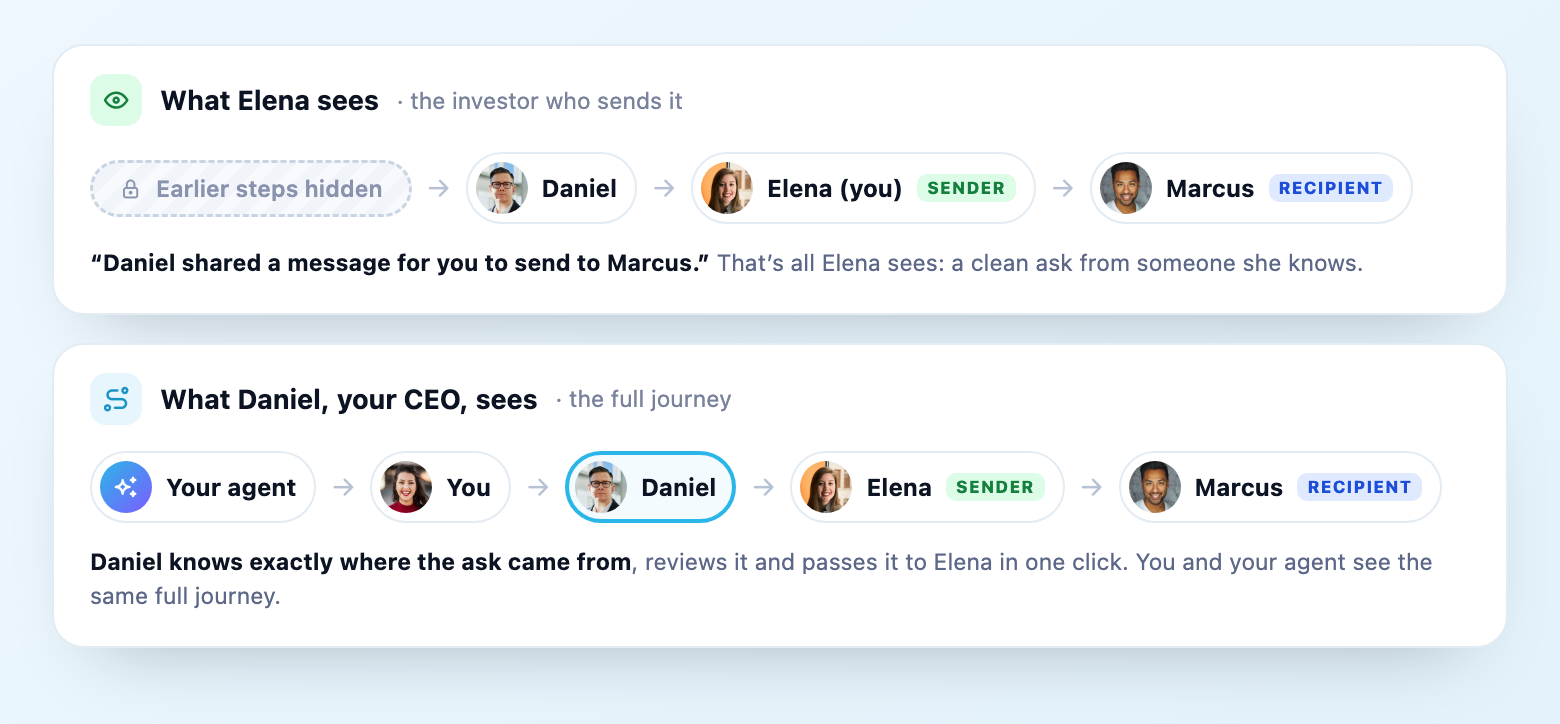
An investor doing your CEO a favor doesn’t need to see the internal hand-offs that came before. So the sender only sees the person who shared it with them: “Daniel shared a message for you to send to Marcus.” Earlier steps stay private.
Everyone else in the chain sees the full journey: who has the message now, and whether it has gone out. Nobody has to ask “did you send it?” again.
What it looks like from every seat in the chain
Here’s the agent-authored version of the chain, seat by seat. Each person gets exactly what they need:
Your agent: does the legwork, never the sending
When your agent is the author, it finds the warmest path and drafts the intro through CTD’s MCP, then hands it to you. It never sends anything on its own: every message passes through people who know the relationships, and a human hits send. That’s what makes it safe to let agents work on your outreach.
You: write it once, then watch it travel
Whether you wrote the message yourself or reviewed your agent’s draft, you set the channel and pick the next person. From then on you see every hand-off, so you always know who has the message and whether it has gone out.
Your CEO: one review, one click to pass it on
Daniel sees the full chain, so he knows exactly where the ask came from and where it’s going. He reviews the message, switches the channel if a text would land better, and shares it with Elena. No forwarded threads, no rewriting.
The sender: a clean ask from someone they know
Elena only sees that Daniel shared a message for her to send to Marcus. She reviews it, edits if needed, and sends it in her own voice.
The target: a personal note, where they actually read
Marcus gets a normal message from Elena, by email, LinkedIn or text. No tools and no chain to wade through: just an intro from someone he knows.
How to send one
- Start a ghost message from any warm path or contact in CTD, or let your AI agent draft one for you through CTD’s MCP.
- Build the chain. You start it, add anyone in between, and the recipient goes last.
- Write the message and pick the channel. Templates, variables and signatures all work as before.
- Share it with the next person. Each person passes it along until it reaches the sender.
- The sender reviews it, edits if needed, and sends it by email, LinkedIn or text. You set the channel when you write it, and anyone along the way can switch it.
Frequently asked questions
Is there a limit to how many people can be in a ghost message chain?
No. Add as many people as it takes to reach the right sender. You start the chain, add anyone in between, and the recipient is always last.
Who chooses whether it goes by email, LinkedIn or text?
The author sets the channel when writing the message, and anyone in the chain, including the sender, can change it. That way the person closest to the target can pick what fits the relationship: email, LinkedIn or text. Either way, the sender reviews the message, can edit it, and sends it themselves.
What does the person who sends it see?
Only the person who shared it with them and the recipient, for example: “Daniel shared a message for you to send to Marcus”. Earlier steps in the chain stay private from the sender, while everyone else in the chain can follow the full journey.
Can an AI agent create ghost messages?
Yes. An AI agent connected to CTD through MCP can author ghost messages: find warm paths, draft the intro, set the channel and share it with you. From there it moves through the chain like any other ghost message, and a person always sends it. You can also write ghost messages yourself for anyone in your company.
Does CTD send LinkedIn messages or texts automatically?
No, the sender always hits send. For LinkedIn, one click opens LinkedIn messages with the text already copied, ready to paste. For text, one click opens the conversation with the message already filled in, so they can edit it and send. For email, the sender reviews it, edits if needed and clicks Send, and it goes out from their own mailbox.