The portfolio intros skill is a slash command for Claude built for VC and PE platform teams. It takes the target-account spreadsheet a portfolio company sends you, creates a company list in CTD, finds every reachable person matching the portfolio company's ideal customer profile, and generates a shareable report of the best warm paths through your firm's network.
How to run it
In any Claude chat window (Desktop or Cowork), attach the target-account file and type:
/ctd-portfolio-introductions [attach or paste the target list] [ICP definition]For example, attach the portfolio company's spreadsheet and type: /ctd-portfolio-introductions VP and above in Marketing - or simply paste the company list into the chat. Plain language works: the skill maps "partners and above", "heads of engineering", "senior procurement roles" onto CTD's seniority, title and function filters.
Before it starts, the skill confirms three settings in one step: the CTD list name, the deliverable format (HTML report or spreadsheet), and whether to include weaker 3rd-degree paths alongside the default 1st/2nd-degree ones.
What to send it
- Target-account list - a CSV or spreadsheet with company names and domains. This is usually exactly what the portfolio company already sent you; no reformatting needed.
- ICP definition - one sentence describing the buyer: job titles, function, seniority. "VP and above in Marketing", "CTOs and Heads of Engineering", "senior procurement roles".
What the skill does
- Validates every domain - dead, mistyped or parked domains are flagged before anything runs against them.
- Creates a company list in CTD - the accounts become a living list in your CTD workspace. The skill returns a direct link, so your platform team can track paths, stages and job changes on the list long after the chat ends.
- Finds reachable people, filtered by the ICP - everyone at the target accounts your firm can actually reach, matched against the titles, function and seniority you specified. By default it keeps the 10 strongest matches per company (adjustable - ask for "top 5" or "everyone who matches").
- Maps the best warm paths to each person - up to 20 ranked routes per person, showing who at your firm (or in your extended network of LPs, advisors and portfolio founders) holds the strongest scored relationship, and why each path is recommended.
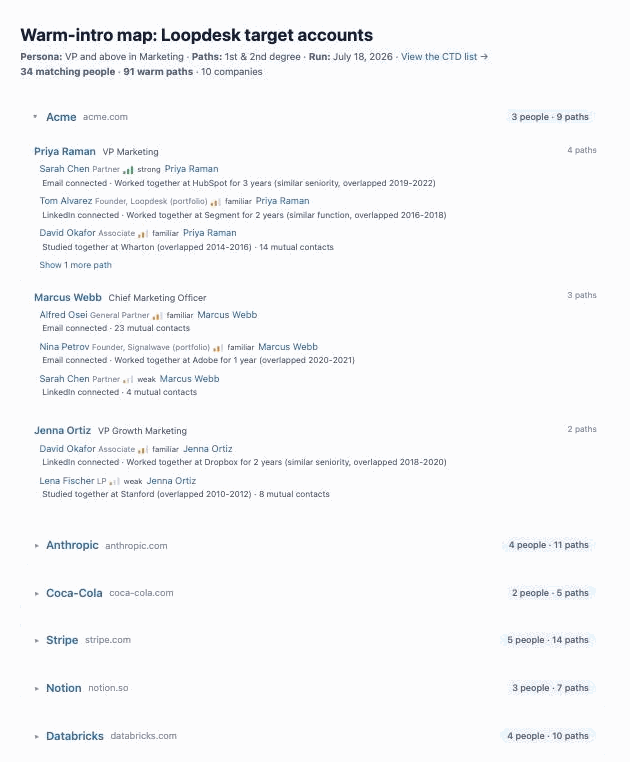
- Generates a shareable report - an HTML page (or spreadsheet) grouped by company, with every reachable person, the ranked paths to them, and relationship-strength indicators on every path. Every person and company links to its CTD profile. Send it to the portfolio company as-is.
How to install the skill
The skill is a zip file you install into Claude Desktop or Cowork. Once installed, the /ctd-portfolio-introductions slash command becomes available in any Claude session where your CTD MCP is also connected.
- Download the skill file: ctd-portfolio-introductions-skill.zip
- Open Claude Desktop or Cowork
- Go to Settings → Customize → Skills
- Click Add → Upload a skill and select the downloaded zip file
- The
/ctd-portfolio-introductionscommand will appear in your slash command list immediately
Getting the most out of it
- Invite portfolio founders as external members first. The single biggest lever on results: every founder who joins as an external member adds their whole network to the searchable graph. Across a portfolio, paths multiply fast.
- Re-run it quarterly. Target lists change and so does your network - people move, new LPs join, new companies enter the portfolio. The same prompt against the same list returns new paths over time.
- Track the list in CTD. The company list the skill creates supports path views, so the platform team can keep working the list in the app.